12. Design Issues in Windowing Systems/Menus
Pull-Down Menus
- Menu Bar
- Standard Organization
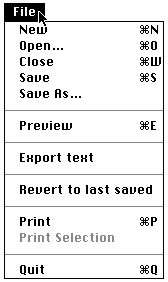
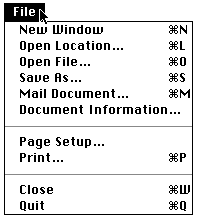
Two FILE -menus (HTML Web Weaver and Netscape)
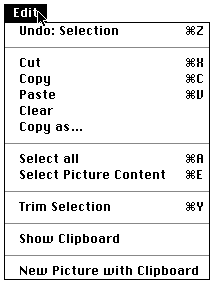
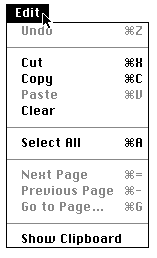
Two EDIT-menus (Gif Converter and SimpleText)
Pop-Up Menus
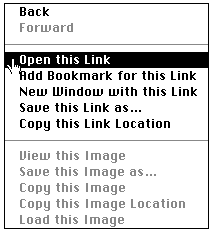
- Appear at mouse position on click - use for selecting next action. Require consederable amount of coordination of the user
Example - Netscape pop-up menu at link location.
Hierarchical Menus
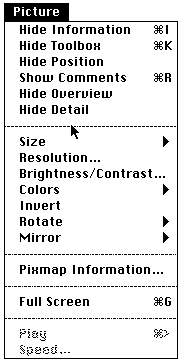
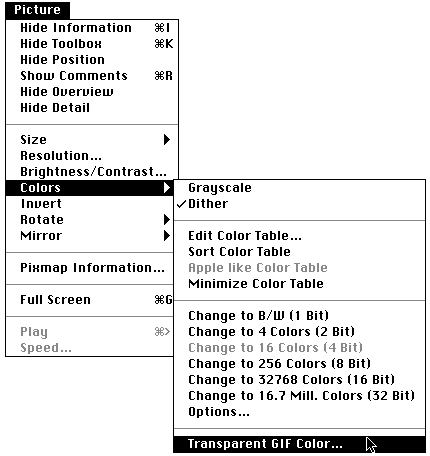
- Avoid too long hierarchies. Next example shows how in GifConverter you can select the transparent colour for the gif-picture - not an easy task
Menu items should be arranged in logical order and grouping
Some alternatives
- Numerical order - font sizes, picture sizes
- Alphabetical order - data entry - (example of student registration)
- Standard orders - cut copy paste
- Use lines between groups
- Try to use one group per menu
- Dim inactivated items