General design
This chapter deals with the general design issues of interactive systems.
Later we go into details of task analysis, human information processing
principles, design tools and different design options in HCI.
Work Spaces
From the users point of view interactive systems are built of work spaces
and links between them.
For example a text processing system may have work spaces :
-
Text editing
-
Printer setting
-
Printing
-
Searching
-
Saving
In a work space the user can do certaing acts - parts of tasks.
The work spaces can be connected to other work spaces by
-
menus
-
dialogue buttons
-
lists
-
hot words
-
links
The links usually represent moving to another work space. Usually that
means opening a new window, or page or bringing the page in the front.
The system can be designed so that the user is allways tied to one
work space (= only one window or dialogue is active) or the user is free
to work on any of the showing work spaces. These are called modeless
or modal work spaces (windows, dialogues).
-
modal dialogue boxes (work spaces)
-
are dialogue boxes which force the user to respond to some question (take
some action) before any other operation can be taken.
-
modeless dialogue boxes (work spaces)
-
offer information and request some action, but do not restrict the actions
of the user. Typically they can be moved, resized, dealt with or ignored
while other interactions continue.
Usually a system includes both (modeless - text processing windows,
modal - printer dialoques, save dialoques)
The design of modal and modeless work spaces - balance between freedom
of action and clarity.
Example: find out which parts of your text processing system are modal
(should they be that way).
Work Space Structure
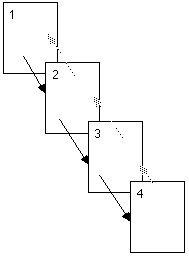
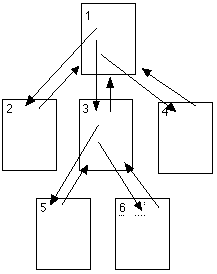
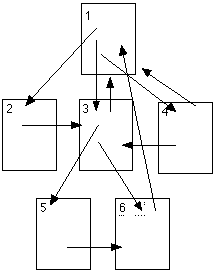
The work spaces can be linked as
-
Linear Structure
-
Hierarchical (Tree) Structure
-
Network Structure
Linear Structure
-
Series of screens
-
Must be followed
-
Forces the order of steps
-
No shortcuts
-
Clear structure
Hierarchical Structure
-
Root page
-
Several dependent pages
-
Move to branches
-
Return to the root
-
User can select the order visiting the branches
-
Clear structure
Network Structure
-
Links to several pages
-
No predetermined order
-
Can be difficult to orientate
-
"Lost in hyperspace"
-
Encyclopedic structure
Work Space Prototypes
When designing an interactive system the overall design can start in
creating a sketch of the work spaces, what actions can be done in a work
space and how the work spaces are linked.
Alternatives
In the beginning of the design the work spaces can be sketched on papers
- storyboards. The designs can be put up on a wall or on the floor for
better overall visual overview.
A sheet of paper can represent a work space . Work spaces can
be connected using strings - colored paper stripes - ...
Try arranging work spaces in different order - alter the hierarchy
of tasks - actions - try to find a natural structure for the tasks.
Question: What are the work spaces of your mobile phone? How can you
navigate between work spaces? (Note that in a small display you can see
only one work space at a time. How does that affect to the design?)
Question: What are the work spaces of your text processing system?
How can you navigate between them?
mj@uwasa.fi 13.3.2002